Backup and Restore Service · View 22 of 26 · 6 · Operations
Decisions
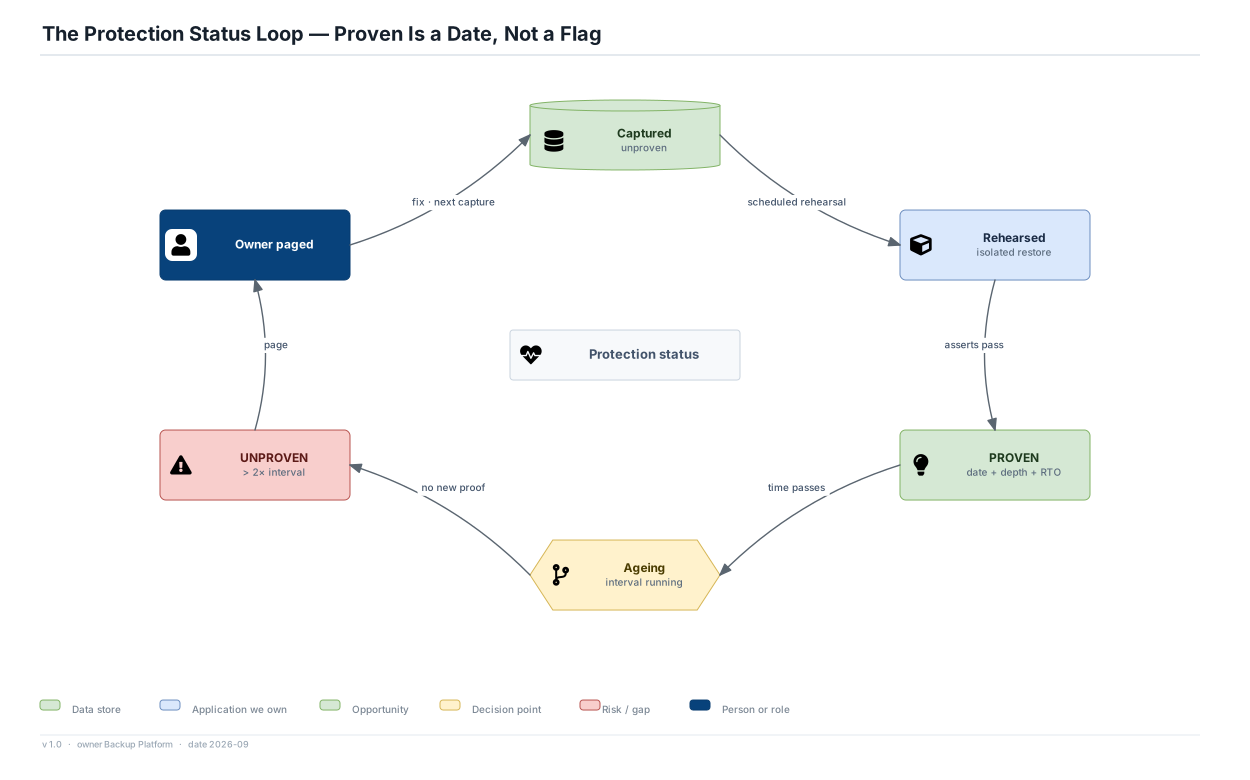
- PROVEN always carries three values: the date, the depth reached, and the measured restore duration. A status without a date looks like a guarantee and is not one.
- Proof expires at twice the verification interval. A Tier 1 datastore not proven in 48 hours becomes UNPROVEN and appears on the same report as unprotected resources, in the same colour.
- Only a successful rehearsal moves a datastore to PROVEN. A successful capture moves it to Captured, which is shown as unproven.
Numbers
- Monthly targets: 100% of Tier 1 proven inside its interval, 98% of Tier 2, 95% of Tier 3. Measured RTO within target in the last 4 drills: 100% for Tier 1.
Why a loop
- Recoverability decays. Schemas change, extensions are added, engines are upgraded. A copy proven in March says little about a restore in September, and the loop makes that decay visible.